Keeping organized helps a blogger spend less time online and helps to keep them less stressed. Which is why I love to keep a nifty blogging binder. My home management notebook is my brain for my home and my blogging binder is my brain for my business.
In today’s post, I’m sharing with you some free printable blogging notebook pages. They are free for you to personally use, but please respect my hard work and don’t steal my ideas or sell them. For a small charge, I can also personalize a notebook for you–just ask me for a quote. 🙂
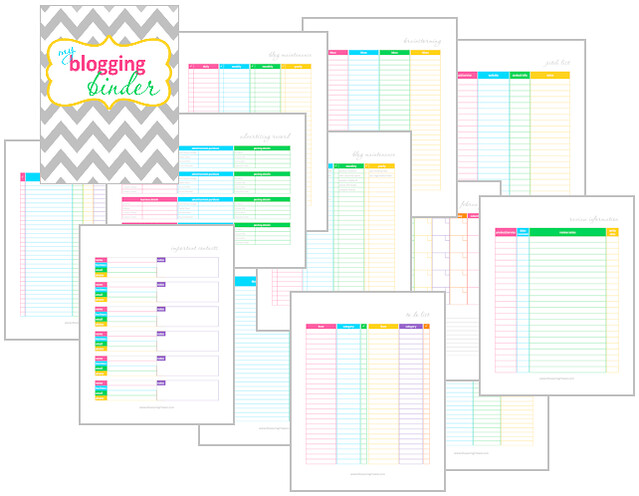
- “My Blogging Binder” Binder Cover
- Spine–.5 inch, 1 inch, 1.5 inch, 3 inch
- Advertising Record
- Blog Maintenance Checklist (blank)
- Blog Maintenance Checklist (with some suggestions)
- Brainstorming
- Editorial Calender
- Giveaways
- Important Contacts
- Income and Expenses
- Internet Passwords
- Pitch List
- Review Info
- To Do List
Other suggestions of things to keep in your blogging binder:
- Some business card pages to keep track of important business cards from PR representative or other bloggers.
- Some binder pockets to store brochures, press releases, and other paper goods or handouts from PR representatives.
- Dividers (I like plastic ones–they’re sturdier) to categorize items.
- Some blank notebook paper to jot notes or whatever.
- A zipper binder pocket to store pens, pencils, and other small odds and ends.
Be sure to also check out my post on my Home Management Notebook with TONS of free printables!
If you’re trying to lose weight the Trim Healthy Mama way, check out my free THM binder printables!

Thanks so much- such a big help to me!
Awesome stuff! Thanks for sharing 🙂
Wonderful organizing help! Thank you so much.
how do I download the freebies?
If you want to save them to your computer, follow the directions given for printing them then click on the floppy disc icon to save. To print them, just follow the directions laid out in the post. 🙂
I searched around quite a bit to find free printables that worked for me, and yours are so great! Simple and clean. I posted about my attempts to get my blog organized or “blorganized”… yes, it’s a very nerdy post. I linked to you, though! 🙂 Thanks for the awesome resources! http://paintingsunny.com/2013/09/23/blorganizing/
Awesome. 🙂 Glad you like it! Gonna check out that post.
This is such a time saver for me, and the design is cute too! Thanks for sharing 🙂
Thanks so much for this! I can’t wait to use them and get organized 🙂
Thank you so much!
You saved my time 🙂
I am trying to do my blogging tasks, but I found out that nothing can be done without planning! These are awesome , thanks again!
THANK YOU SO MUCH! I cannot say it enough. I am in serious need of better blogging organizing skills, but haven’t been able to budget for one of the planners that I’ve seen out there to help bloggers get their stuff together. This is going to be SUCH a great help to me. Passing on to my blogging pals too!
this is great thank you I can’t wait to get ink to print these this will help me out alot. thanks so much
Wow, thank you so much!! It’s very nice.
Great content, very useful information. Thank you for sharing.